Se connecter
WhatsApp Business utilisant Clientify

66 clics

ChatWith.io
¿Cómo puedo ayudarte?
Agency / SEO / Design
66 clics
Support
Hi!
66 clics
debug bookings
xxxx
Agency / SEO / Design
66 clics
wipe
retertert
Agency / SEO / Design
65 clics
ChatWith.io
Use ChatWith.io's Widget for making bookings
Agency / SEO / Design
65 clics
Widget para Ventas
¿Cómo puedo ayudarte?
Agency / SEO / Design
65 clics
free booking test
free booking test
Agency / SEO / Design
65 clics
Odo
Hi!
64 clics
freebooking 2
sr
Agency / SEO / Design
64 clics
¡Widget Test automated!
sss
64 clics
ChatWith.io
Testtt
Agency / SEO / Design
64 clics
ChatWith.io
Quiero más información
Agency / SEO / Design
Précédent
1
…
12
13
14
15
(current)
16
17
18
…
56
Suivant
Ajoutez le widget sur votre site web
1. Copiez ce code
Le code de votre widget
Copier le code
Copié dans le presse-papiers
ou votre numéro de clé (
Learn how to add your Widget to your Wordpress website
)
Copier le numéro de clé
Copié dans le presse-papiers
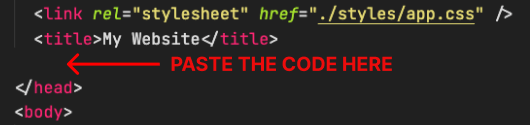
2. Collez le code
Placez le code juste avant la balise </head> dans le HTML de votre site web